
HISE encourages a modular approach to scripting. Instead of using one large script that controls everything, most behaviour lives in small MIDI processors that each handle a single task. The exception is the main interface script as each project can only have one of these.
You can control which modules a script affects or is affected by based on where you place it in the module tree. For example, a processor in the master chain affects everything. One inside a sampler only affects that sampler. It keeps things tidy and makes it much easier to solve problems that might arise.
As your HISE projects develop, you’ll eventually want features that the no-code tools can’t provide. You might not feel ready to get into scripting just yet, and that’s where the built-in scripts help. They add useful behaviour with very little setup and can solve small problems long before you need any custom code.
Adding a Script Processor
Adding a script processor is simple. Click the plus button to the right of the MIDI Processor chain in the module tree. If you don’t see it, unlock the module tree by clicking the pencil icon at the top left.
You can add scripts to any MIDI Processor chain at any level in the project. In the example shown, the script is being added to the Master Chain.
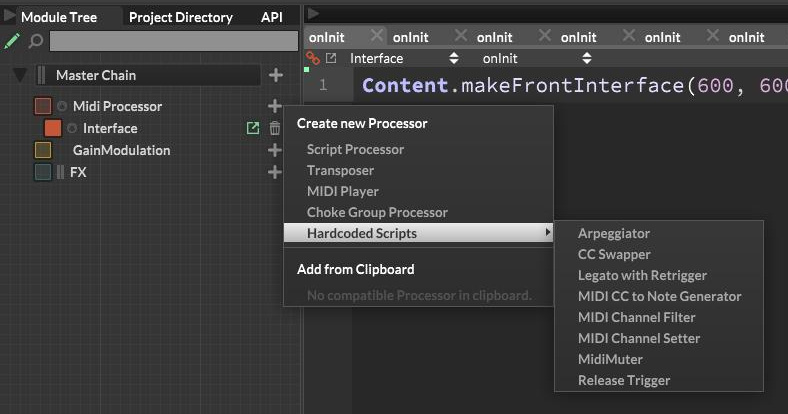
The plus button opens a drop-down menu. From there you can add a blank script processor for your own code, or choose one of the factory scripts. There are additional scripts in the Hardcoded Scripts sub-menu.
Script Interfaces
Some factory scripts, such as the Arpeggiator, include a full interface that lets you adjust the script’s behaviour. This interface is only for us as developers. The end user never sees it. If we want the user to control any of these settings, we can link the internal parameters to components on our project’s main interface.
Other scripts, like Legato with Retrigger, have no editable controls at all. You simply drop them into your project and they work straight away. When you start writing your own scripts, you can decide whether to include an internal interface or not.
The Main Limitation
One limitation you might run into with the factory scripts is that they aren’t designed to work together. For example, the Transposer won’t shift the notes produced by the Arpeggiator. Each script works independently, so combining them often isn’t possible. When you reach this point, you have three options: hire a scripter, use a script from the HISE community, or write your own.
Hiring a scripter can be expensive for anything more than a simple task. There’s also a risk that their script won’t integrate well with others in your project, especially if they weren’t all written by the same person.
Using community scripts can be a good option if you find one that does exactly what you need. The same limitations apply though: it may not play nicely with the factory scripts or other community scripts. If you find a script that’s close to what you want, it’s often not too hard to make small tweaks yourself. You can also ask the original author if they’re willing to make the adjustment for you.
Writing your own scripts gives you the most flexibility. It’s the most involved option, but it allows you to build exactly what your project needs. You can ensure your script behaves properly alongside the factory scripts, extend it with new features whenever required, and fix any issues without relying on someone else.
Final Thoughts
HISE’s hardcoded scripts are quick to use, easy to drop in, and perfect for early stages of a project. They let you get results straight away without touching the scripting editor. Unfortunately we can’t make edits to these scripts, so if we need custom behaviour, we have to get deeper into scripting.
A good middle-ground when you’re just starting out is to use community scripts. These are scripts written by members of the HISE community and usually made available on the HISE forum. I’ll be posting another article in a couple of days where we’ll explore some of these.
thanks very interesting